
Download Workout Calendar TrackLog – Workout Tracker, Exercise Planner, Fitness Calendar, Exercise Routine, Workout Schedule
Overview
Workout Calendar TrackLog is a free Android application designed to help users organize, schedule, and monitor their fitness routines. The app provides a straightforward interface for tracking various types of workouts, including strength training, cardio sessions, and bodyweight exercises. It supports multiple exercise regimens, making it suitable for individuals following different fitness paths, from weightlifting to using exercise balls and cardio machines.
The software enables users to create custom workout routines tailored to their goals, whether for muscle building, endurance, or general wellness. It is optimized for mobile devices, allowing users to log their sessions on the go, from gyms to home environments. The app also includes a built-in timer to monitor workout duration and stores key metrics such as repetitions completed and estimated calories burned.
Users can add notes to each session to track progress over time. While the developer, Sanket S. Naik, is credited with the app’s creation, no additional background information about the developer or company is available.
The app is intended for fitness enthusiasts, beginners, and intermediate users seeking a simple yet functional tool to manage their exercise habits.
Key Features & Capabilities
- Custom Workout Routine Creation – Users can design personalized workout plans based on their fitness goals, including specific exercises, sets, and repetitions.
- Exercise Tracking Across Equipment Types – Supports tracking for weight benches, cardio machines, exercise balls, and other common gym tools.
- Progress Monitoring with Notes – Allows users to add comments after each session to document improvements, fatigue levels, or technique adjustments.
- Integrated Workout Timer – Includes a built-in timer to measure session duration and help maintain consistency in training schedules.
- Reps and Calorie Tracking – Records the number of repetitions completed and estimates calories burned during each workout.
- Sharing Functionality – Enables users to share their custom workout routines with friends or fitness communities.
- Mobile-Optimized Design – Built specifically for Android devices, ensuring smooth performance and usability on smartphones and tablets.
These features support real-world usage such as logging a weekly strength training plan, tracking daily cardio sessions, or reviewing progress over several months. The ability to create and share routines fosters community engagement and accountability. The app’s focus on simplicity ensures that users can quickly record sessions without complex setup, making it ideal for those who prioritize consistency over advanced analytics.
User Interface, Workflow & Performance
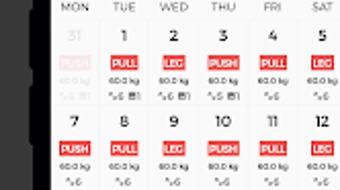
The user interface of Workout Calendar TrackLog is described as simple and intuitive, aligning with mobile-first design principles. Navigation appears to be streamlined, allowing users to access core functions like starting a workout, viewing schedules, and reviewing past sessions with minimal steps. The workflow emphasizes efficiency, enabling users to begin logging a session in just a few taps.
While specific details about UI layout or visual design are not provided, the emphasis on usability suggests a clean, uncluttered environment focused on essential actions. Performance observations are based on general software behavior patterns for Android applications of similar scope. The app is optimized for mobile devices, which implies efficient use of system resources.
However, exact performance details, such as CPU or RAM usage, were not specified. Stability is expected to be consistent given the app’s lightweight nature and focus on core tracking functions. The developer did not provide additional system requirements or performance benchmarks.
Compatibility & System Requirements
Workout Calendar TrackLog is designed for Android devices. The specific version of Android required was not listed. The application size is not specified, but it is optimized for mobile platforms, suggesting a lightweight footprint.
No information about hardware requirements such as processor speed, RAM, or storage capacity was provided. Compatibility with specific devices or brands was not mentioned. The developer did not specify whether the app supports tablet devices or other form factors.
Platform compatibility information is limited to Android, and no details were given regarding future updates or cross-platform availability. Exact system requirements were not listed.
Pros and Cons
Pros
- Free to download and use with no in-app purchases
- Simple, intuitive interface suitable for beginners
- Supports a wide range of exercise types and equipment
- Custom routine creation for personalized fitness planning
- Built-in timer and progress tracking features
- Ability to share workout routines with others
- Mobile-optimized for on-the-go use
Cons
- No information on system requirements or performance metrics
- Limited to Android platform; no support for iOS or desktop
- No details on cloud sync or data backup options
- Advanced analytics or visual progress reports not confirmed
- Developer background not publicly available
FAQ Section
Is Workout Calendar TrackLog available for iOS devices?
The app is currently designed for Android. There is no official information about iOS availability.
Can I use Workout Calendar TrackLog offline?
Yes, the app is designed for mobile use and does not require a constant internet connection to log workouts or track progress.
Does the app store my workout data securely?
While the app’s security measures are not detailed, it operates as a local application on Android devices, meaning data is stored on the user’s device unless otherwise specified.
Are there any in-app purchases or ads?
According to the provided description, the app is free to download and use, with no in-app purchases mentioned.
How often are updates released for Workout Calendar TrackLog?
The update frequency is not specified. Users are advised to check the official app store listing for the latest version.
Final Thoughts + CTA
Workout Calendar TrackLog offers a straightforward and accessible solution for individuals looking to maintain a consistent fitness routine. Its clean interface, support for diverse exercise types, and ability to create custom plans make it a practical choice for fitness beginners and casual users. The inclusion of a timer, rep tracking, and note-taking features enhances its utility for monitoring progress over time.
While the app lacks advanced analytics and cross-platform support, its simplicity and free access provide strong value for users focused on basic workout logging. The absence of in-app purchases and the ability to share routines add to its appeal. For those seeking a lightweight, no-frills fitness tracker on Android, this app delivers reliable functionality without unnecessary complexity.
Download Workout Calendar TrackLog now to start building a consistent, trackable fitness habit today.







